federal-homelab
WS01 STIG remediation
Windows 11 hardening applied through DISA’s published Group Policy Objects, scoped to a Workstations OU, with supplemental policy for the gaps the package leaves open.
| Baseline | 2026-09-17 — 38.84%, 148 failed rules |
| Post-remediation | 2026-09-22 — 97.11%, 7 failed rules |
| Benchmark | Microsoft Windows 11 STIG V2R10 / 002.010.018, profile MAC-2 Sensitive, unchanged between scans |
| Policy source | DISA “DoD Windows 11 STIG” GPO package, v2r8 |
Method
The DISA GPO package ships Computer and User policy as GPO backups rather than as an installer. Remediation was import, scope, apply, verify — not a one-shot run:
- Import both backups into new GPOs on DC01 using a migration table, so the deny-rights entries resolve to real domain principals rather than placeholder text.
- Link only to
OU=Workstations,OU=Lab,DC=lab,DC=local. Linking at the domain root would apply workstation policy to the domain controller. - Enable loopback processing in Merge mode so the User half reaches whoever logs on to WS01.
- Apply the Computer half first, reboot, verify a working desktop, snapshot. Then the User half, reboot, verify, snapshot. Staging the two halves separately means a failure names its own cause.
- Rescan, remediate what the package does not cover, rescan again.
The migration table trap
The package’s deny-rights entries contain placeholder principals such as ADD YOUR DOMAIN ADMINS.
A migration table maps them to real accounts at import time. The mapping is directional: the
placeholder stays in <Source> and the real group goes in a new <Destination> element, replacing
the default <DestinationSameAsSource />.
Editing the <Source> value instead produces an import that succeeds silently and writes
unresolvable text into User Rights Assignment. The GPO then reports as configured while enforcing
nothing. Verification is therefore done against applied policy on the host, not against the GPO
report:
secedit /export /areas USER_RIGHTS /cfg "$env:TEMP\ur.inf"
Select-String -Path "$env:TEMP\ur.inf" -Pattern 'SeDeny'
All five deny rights resolved to SIDs — S-1-5-113 (local account), the domain’s -512 and -519
(Domain Admins, Enterprise Admins), and S-1-5-32-546 (Guests). SeDenyInteractiveLogonRight
correctly omits S-1-5-113, which is why local console logon still works.
Package version drift
The GPO package is v2r8. The SCAP benchmark scanned against is V2R10 — two releases newer.
The package’s own manifest also lists GUIDs that differ from those the archive actually contains, so
the GPO backups must be identified by reading each backup.xml rather than trusting the manifest.
The drift is not theoretical. Three rules present in V2R10 have no corresponding setting in the v2r8 package and failed after a clean import and apply:
| Rule | STIG ID | Scope | Value the package does not set |
|---|---|---|---|
| V-253425 | WN11-CC-000390 | Computer | HKLM\SOFTWARE\Policies\Microsoft\Windows\CloudContent\DisableThirdPartySuggestions |
| V-253477 | WN11-UC-000015 | User | NoToastApplicationNotificationOnLockScreen |
| V-253478 | WN11-UC-000020 | User | SaveZoneInformation |
The two user-scope rules were confirmed by controlled comparison: an account that received the User STIG GPO still lacked both values, while an account configured by hand had them. The gap is in the package, not in policy delivery.
These are supplied by a supplemental GPO, Lab - STIG V2R10 Supplement, named so the reason for
its existence is readable from the GPMC console.
Scoping and the local-account limitation
Several STIG rules evaluate user-scope policy, and the SCAP content checks them against every user
profile’s NTUSER.DAT on the system, not just the scanning user’s. That makes the delivery path
for user policy a compliance question rather than a convenience.
Loopback processing in Merge mode is enabled and verified on the host
(HKLM\SOFTWARE\Policies\Microsoft\Windows\System\UserPolicyMode = 2). It works — a domain user
whose account lives outside the Workstations OU still receives the User STIG GPO, because loopback
uses the computer’s OU.
It does not work for local accounts. In Merge mode the Group Policy engine evaluates a GPO’s
security filtering against the user, and the default filter is Authenticated Users, a domain
group. A local account is not a domain principal and cannot be granted permissions on a domain GPO,
so there is no configuration that fixes this.
Consequences:
| Consequence | Handling |
|---|---|
| Local accounts never receive user-scope STIG settings | Values written directly into the local profile’s hive, documented as manual remediation |
| Scanning as a local administrator would report user-scope failures that reflect the account, not the machine | A domain account, LAB\stigadmin, was created and added to WS01’s local Administrators group for scanning |
| Stale profiles fail user-scope rules permanently | A leftover LAB\Administrator profile was removed — the STIG denies Domain Admins interactive logon, so that profile could never be refreshed by policy |
stigadmin is a plain domain user with local administrator rights. It is deliberately not a Domain
Admin, because the Windows 11 STIG denies Domain Admins and Enterprise Admins every logon type on
workstations.
Supplemental policy
Four lab-authored GPOs are linked to the Workstations OU alongside the two DISA GPOs. Link order 1 has highest precedence.
| Order | GPO | Purpose |
|---|---|---|
| 1 | Lab - BitLocker TPM+PIN Override |
Resolves a contradiction in the package’s BitLocker startup options; supplies the recovery-escrow policy the package omits |
| 2 | Lab - Nessus Scan Account |
Grants the scanner service account the access credentialed scanning needs |
| 3 | DoD Windows 11 Computer STIG v2r8 |
DISA package |
| 4 | DoD Windows 11 User STIG v2r8 |
DISA package |
| 5 | Lab - Workstation Loopback (Merge) |
UserPolicyMode = 2 |
| — | Lab - STIG V2R10 Supplement |
The three V2R10 rules absent from v2r8, Computer and User halves |
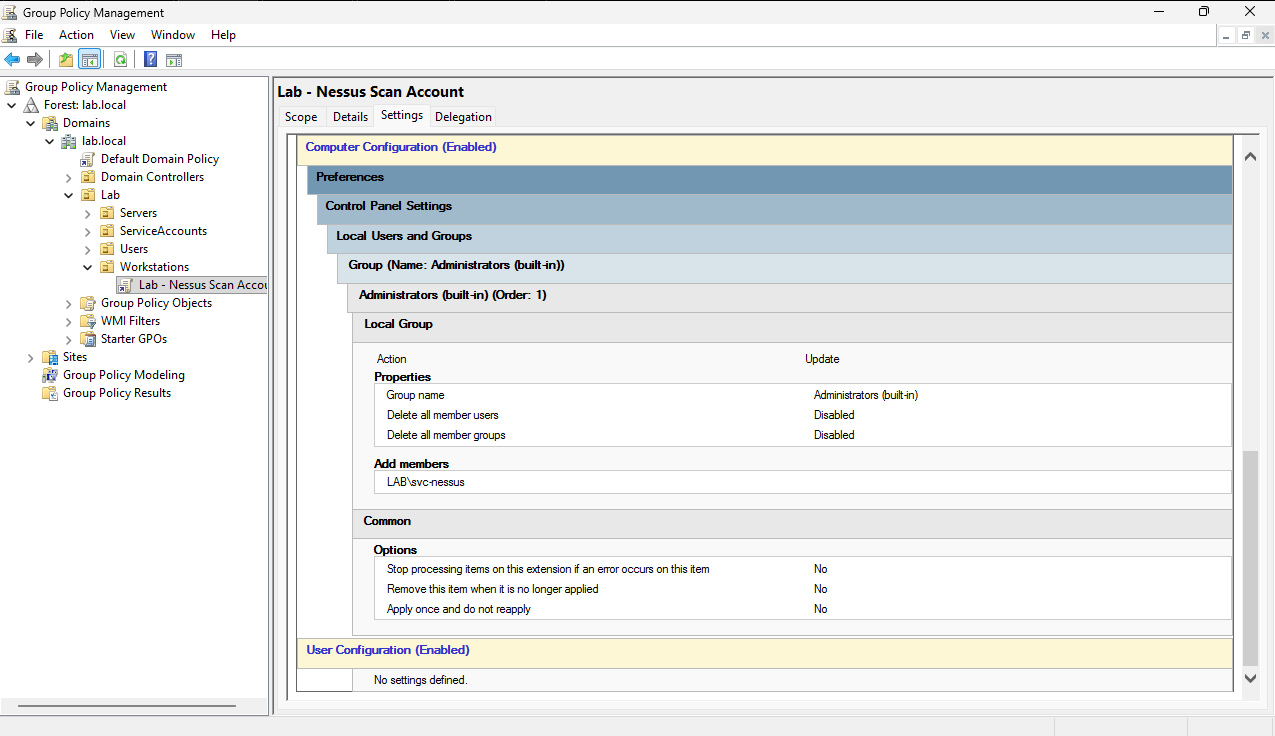
Lab - Nessus Scan Account grants the scanner its local administrator rights through Group Policy
Preferences rather than by hand, so the grant is auditable and reversible by unlinking one GPO.
Captured before the STIG GPOs were linked, which is why the Workstations OU shows a single link
here:
Defects found in the DISA package
Three issues in the published content, each reproducible:
1. BitLocker startup options are self-contradictory. The package simultaneously permits TPM-only
startup, requires a startup PIN, and allows BitLocker without a TPM. Enable-BitLocker rejects the
combination with 0x8031005B. Resolved by a scoped override GPO at link order 1 setting
UseAdvancedStartup=1, UseTPM=0, UseTPMPIN=1, UseTPMKey=0, UseTPMKeyPIN=0,
EnableBDEWithNoTPM=0, MinimumPIN=6.
2. The package enforces pre-boot authentication but omits recovery escrow. With the package
alone, Backup-BitLockerKeyProtector fails:
Group policy does not permit the storage of recovery information to Active Directory.
OSRecovery, OSActiveDirectoryBackup, and OSActiveDirectoryInfoToStore are never set. A machine
configured strictly from the package encrypts its system volume behind a PIN with no recovery key
escrowed anywhere — a single forgotten PIN makes the host unrecoverable. These values are supplied
by the override GPO, after which Backup-BitLockerKeyProtector succeeds and the recovery password
is verifiable as an msFVE-RecoveryInformation object beneath WS01’s computer account in Active
Directory.
3. Version drift, described above.
Account renaming
The Computer STIG GPO renames the built-in accounts itself; no manual step is required. After apply,
the SID ending -500 is named X_Admin and -501 is Visitor. Both remain disabled. Verification
uses the SID suffix rather than the name, since the name is the thing under test.
Domain-side changes
Workstation account policy comes from the local SAM and is set by the GPO, but domain accounts are governed by the domain. The domain baseline was well short of it:
| Setting | Before | After |
|---|---|---|
| Minimum password length | 7 | 15 |
| Maximum password age | 42 days | 60 days |
| Account lockout threshold | 0 — disabled | 3 |
| Lockout duration / observation window | 10 / 10 min | 15 / 15 min |
Lockout being disabled domain-wide was the more serious of the two: every domain account, including the scanner service account, permitted unlimited authentication attempts.
Group Policy caps minimum password length at 14 in the UI. The cap is liftable — Relax minimum
password length limits, supported on Windows 10/Server version 2004 and later, raises the ceiling
to 128 and writes
HKLM\SYSTEM\CurrentControlSet\Control\SAM\RelaxMinimumPasswordLengthLimits. Both DC01 and WS01 are
well past that version, so 15 characters is enforced rather than recorded as a tooling limitation.
A fine-grained password policy, STIG-Privileged (20 characters, precedence 1), applies to the
scanning and service accounts; ordinary domain users fall through to the 15-character domain
baseline.
One fine-grained policy defect was found and corrected during this work: two policies existed at the
same precedence value, one scoped to Domain Users and one to the privileged group. Active
Directory breaks precedence ties by comparing object GUIDs, so the privileged policy was applying to
nobody while appearing correctly configured. Get-ADUserResultantPasswordPolicy per account, rather
than the policy list, is what surfaced it.
BitLocker
The system volume arrived already 100% encrypted at XTS-AES 128 by Windows’ automatic Device Encryption, with protection off and no key protectors — an encrypted volume whose key sits unprotected on disk, which satisfies nothing.
WN11-00-000030 tests one condition:
SELECT protectionstatus FROM win32_encryptablevolume → must equal 1
Reading the OVAL definition rather than the rule title changed the remediation substantially. No decryption or re-encryption was required: adding a recovery password protector and a TPM+PIN protector, then resuming protection, satisfies the rule as a metadata operation rather than a full-volume rewrite. Pre-boot PIN rules (WN11-00-000031/32) were already passing from policy alone.
Add-BitLockerKeyProtector -TpmAndPinProtector fails with 0x80310030 while a bootable ISO is
attached to the VM’s virtual optical drive; the drive must be disconnected first.
Residual, self-identified: the volume remains XTS-AES 128 and Used Space Only. No rule in this benchmark tests either, so the scan does not flag it, but used-space-only encryption leaves previously deleted sectors in clear text and DoD prefers 256-bit. Carried in the POA&M as a deferred maintenance action rather than left unstated.
Virtualization-based security
The STIG’s VBS settings apply cleanly but do not take effect on their own. After a clean apply,
Win32_DeviceGuard reported SecurityServicesConfigured {1,2} with
VirtualizationBasedSecurityStatus = 1 — configured, not running.
Two prerequisites outside Group Policy:
| Prerequisite | Action |
|---|---|
| CPU virtualization extensions exposed to the guest | Enable “Virtualize Intel VT-x/EPT” and IOMMU on the VM |
| Hyper-V hypervisor present | Enable-WindowsOptionalFeature -FeatureName Microsoft-Hyper-V-Hypervisor -All plus bcdedit /set hypervisorlaunchtype auto |
VBS runs inside Hyper-V’s hypervisor; with the feature absent there is nothing for it to run on.
After both, VirtualizationBasedSecurityStatus = 2 and SecurityServicesRunning = {2} — VBS and
HVCI active. Credential Guard (1) remains absent, as expected on Pro.
Two side effects, both handled:
- Enabling the hypervisor with
-Allpulls in the full Hyper-V feature family, including the Virtual Machine Management Service, which creates a NAT-capablevEthernet (Default Switch)adapter. A second network interface on a host documented as network-isolated is not acceptable even when it carries no traffic.vmmswas stopped and disabled; the adapter disappeared and VBS was unaffected. - Hyper-V setup grants
S-1-5-83-0(NT VIRTUAL MACHINE\Virtual Machines) the create-symbolic-link and log-on-as-a-service rights. That SID does not resolve to a name, so the STIG counts it as an orphaned SID and V-253290 began failing. Removed viaseceditexport, edit, and reconfigure of the USER_RIGHTS area.
Net effect: enabling VBS closed two rules and opened one, which was then closed.
Incident: shell failure after first BitLocker attempt
Recorded because the response matters more than the fault.
A first BitLocker attempt on an earlier disk image completed encryption at XTS-AES 256 with a
TPM+PIN protector. After the next reboot, every interactive logon — one local account and one
domain account — reached an authenticated session with no shell: explorer.exe and taskmgr.exe
never launched, while sihost.exe and all dependent services ran normally.
Diagnosis was performed remotely over CIM from DC01, since the host had no usable desktop, and
eliminated in order: Group Policy (both STIG GPOs unlinked, no change), application control (no
AppLocker rule collections present), the Shell and Userinit registry values (both nominal),
service state, and memory pressure. The condition persisted in Safe Mode and in Safe Mode with
Command Prompt, which placed the fault in the image rather than its configuration.
The host was restored from a snapshot predating the encryption and rebuilt forward. Root cause was not isolated before rollback; the image in question had a prior history of component-store corruption that DISM and SFC could not repair, and a full-volume encryption pass rewrites every sector. The second attempt, on a clean image and without a re-encryption pass, completed and rebooted normally.
Practical conclusions carried forward: stage changes so a failure names its own cause, snapshot before each stage, and bank a measured result before attempting the step already known to be destructive.
Operational effects
| Effect | Detail |
|---|---|
| Pre-boot authentication | A PIN is required at power-on before Windows loads |
| Account lockout | 3 failed attempts locks a domain account for 15 minutes |
| Passwords | 15 characters domain-wide, 20 for privileged and service accounts, 14 for local accounts |
| Privileged logon | Domain Admins and Enterprise Admins are denied every logon type on WS01. Administration is performed from DC01, and scanning uses purpose-built accounts |
| Local accounts | Receive no user-scope policy; treated as break-glass only |
| Group Policy log | Device Guard CSE {F312195E-3D9D-447A-A3F5-08DFFA24735E} logs an apply failure at every refresh — expected, and traceable to Credential Guard being unavailable on Pro |
| Remote Registry | Disabled; enabled only for a credentialed scan window and disabled afterwards |
Not remediated
Seven rules remain open — three with no remediation path in this environment, four awaiting certificate content newer than the current distribution tool provides. Listed with reasons in the post-remediation scan summary and carried into the POA&M.